SPIn USB
Overview
The SPIn USB API enables direct communication between a register application and a Dejavoo payment terminal over a USB connection. SPIn USB is available in two deployment modes:
- SPIn USB – Uses a direct USB connection as the primary communication channel between the POS application and the payment terminal.
- SPIn USB as Fallback – Uses SPIn Cloud as the primary communication channel and automatically switches to USB communication in case of network failure, SPIn Cloud unavailability, or connectivity disruptions.
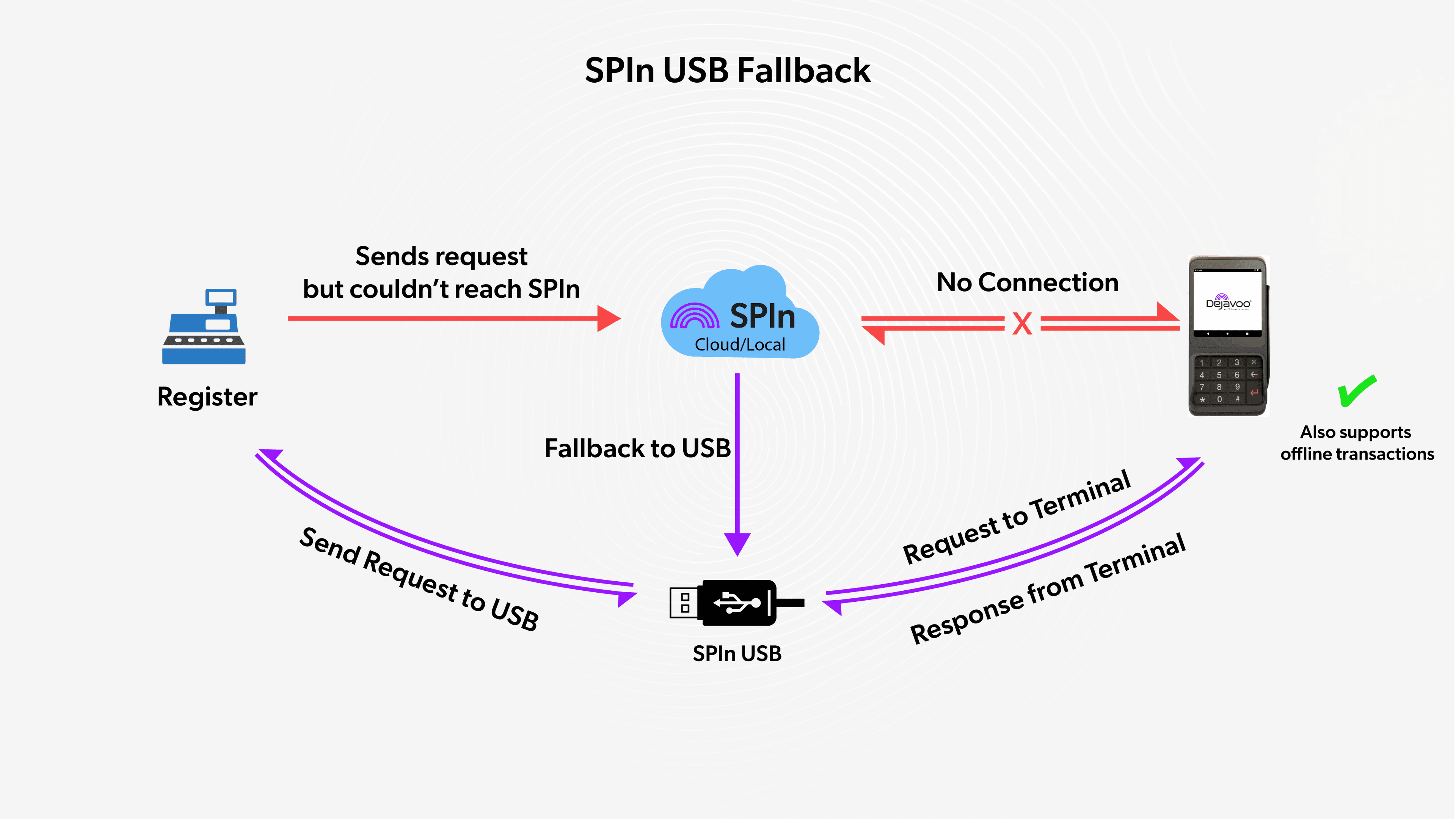
When using SPIn USB, integrators do not need to modify their existing integration logic. Both deployment modes use the same USB communication framework, request and response formats, and integration flow. The only difference is how the integration is configured within the iPOSpays portal.
Ensure the USB connection between the payment terminal and the host system (register) is properly established. If the host device does not have a USB port, an OTG cable can be used to complete the connection.
SPIn USB is also a recommended option for performing transactions in Offline Mode. For Offline Mode to work, it must be enabled for the terminal’s TPN. Make sure Offline Mode is enabled for your TPN before using this feature.
Click here (opens in a new tab) to learn how to enable Offline Mode for your TPN.
Requirements
Hardware Requirements
-
Android device with USB Host support
-
Dejavoo P17 POS device supporting USB serial communication
-
USB OTG support (for mobile devices and tablets)
-
USB cable compatible with Windows
Android Requirements
-
Minimum SDK 21 or higher
-
USB Host feature enabled
-
hoho usb-serial library integrated
Supported Terminals
- Dejavoo P17
How to Configure SPIn USB (Parameters)
Follow the steps below to configure SPIn USB for a merchant from the iPOSpays portal.
-
Log in to the iPOSpays portal using an ISO Admin account.
-
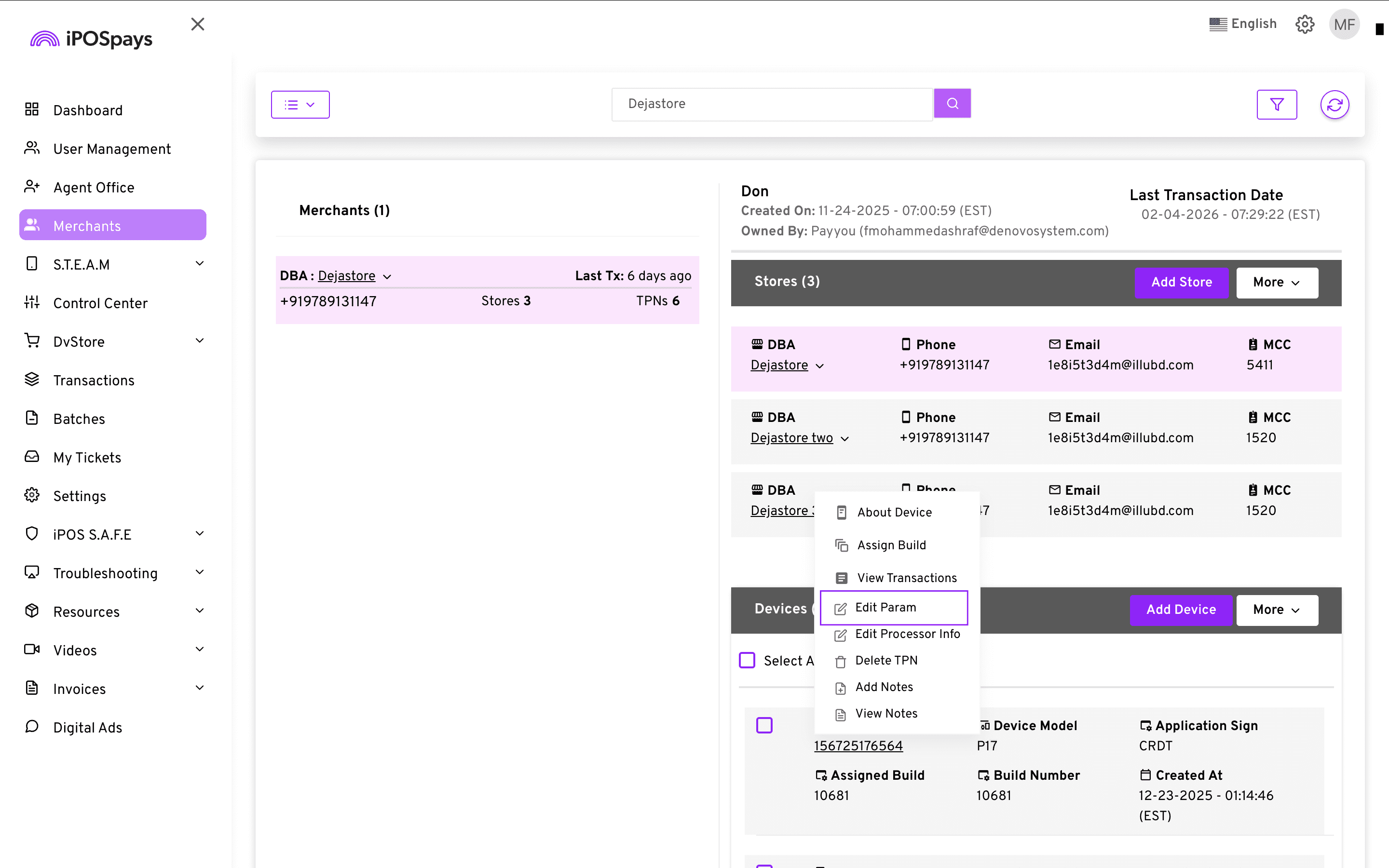
Click on Merchants and use the search box to find and select the required merchant.
-
Under Devices → select the appropriate TPN from the dropdown → click Edit Param.
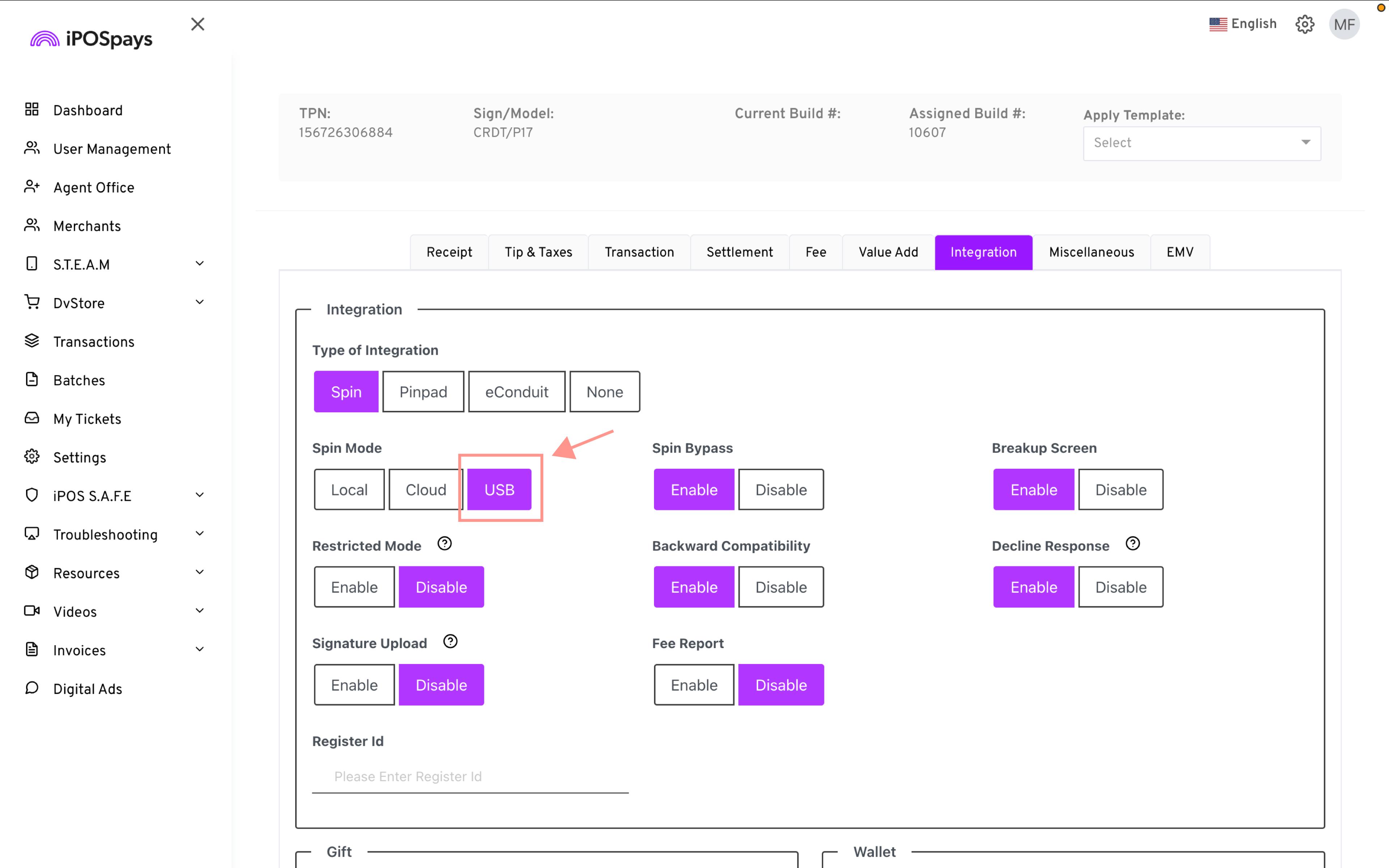
- Go to the Integration section.
-
For SPIn USB:
-
Under Type of Integration, select SPIn.
-
Under SPIn Mode, select USB.
-
-
For SPIn USB as Fallback:
-
Under Type of Integration, select SPIn.
-
Under SPIn Mode, select Cloud.
-
Enable the USB Fallback option.
-
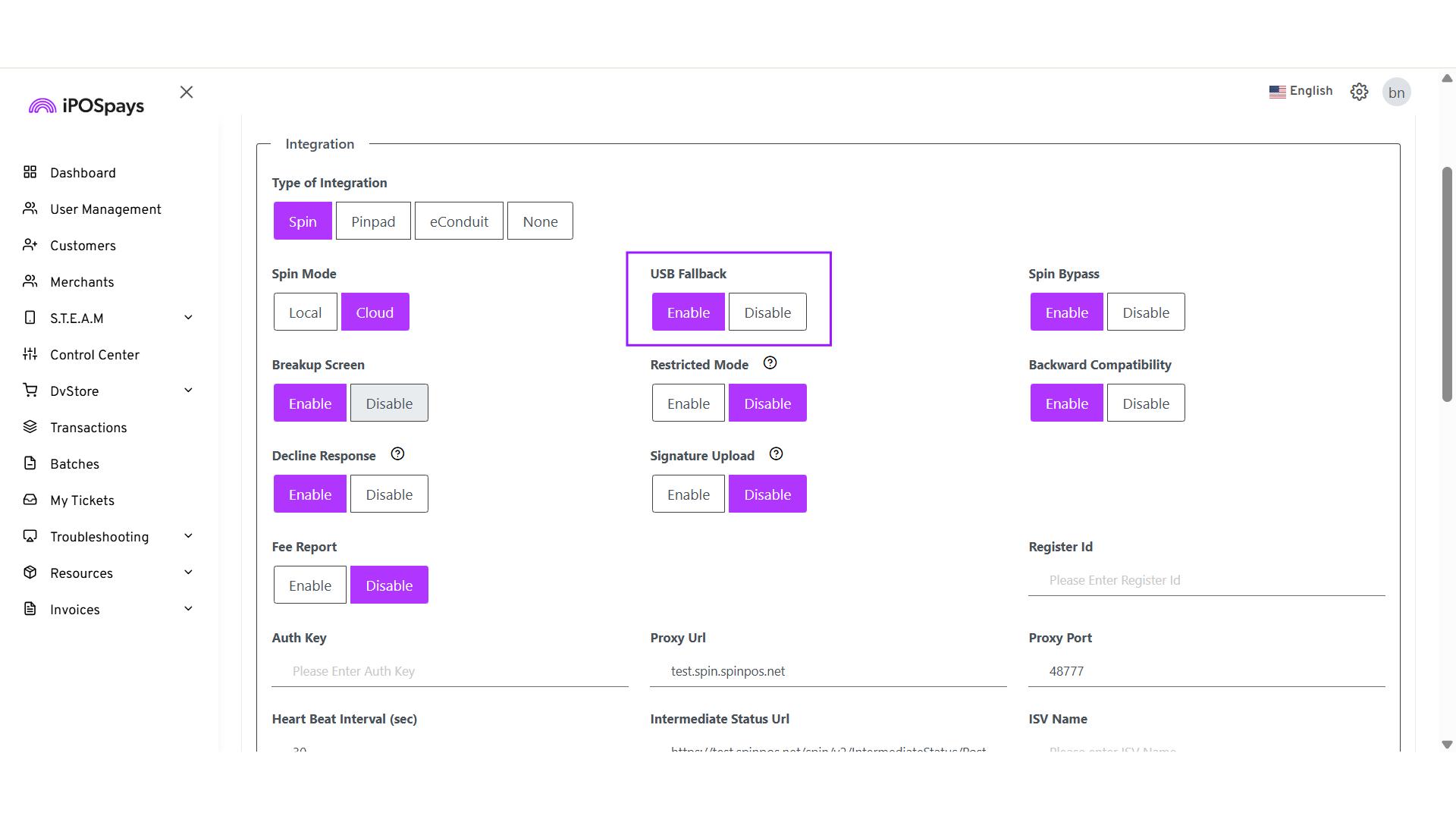
-
Click Save to store the changes.
-
Perform a parameter update on the payment terminal for the changes to take effect.
How to Connect the USB-Cables on P17
Follow the steps below to correctly connect the USB cables on the P17 terminal.
-
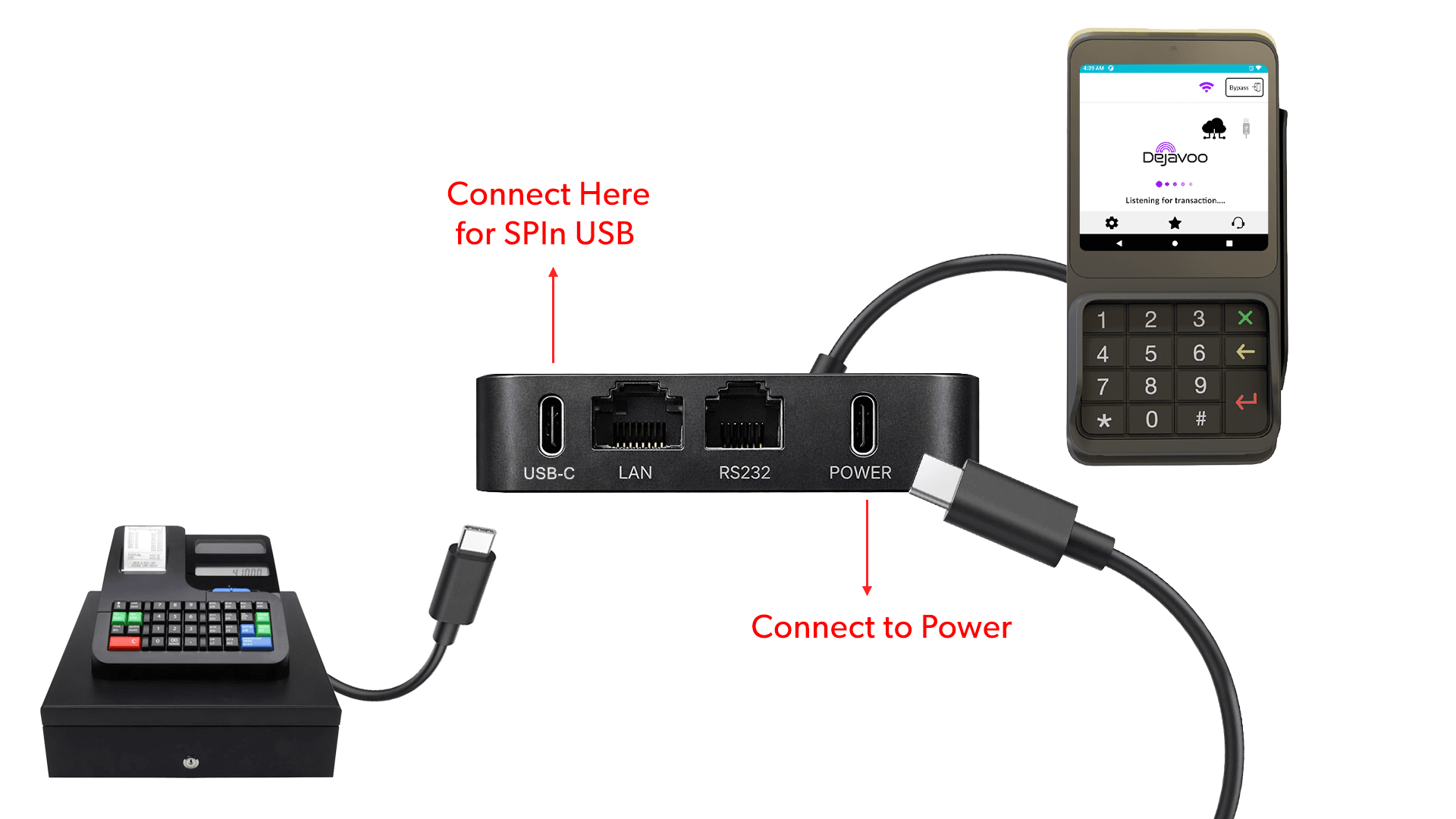
The P17 terminal comes with a USB hub attached.
-
The USB hub has two USB-C ports, one on each end at the top of the hub.
-
Connect a USB-C cable from a power supply to the port labeled “POWER.”
-
Connect another USB-C cable from the port labeled “USB-C” to your register for SPIn USB.
-
Ensure both connections are secure before proceeding with transactions.
After connecting the terminal, the SPIn Cloud and USB logo will appear on the amount entry screen.
Project Setup
Gradle Dependency
Add the following dependency to your build.gradle (app) file:
implementation 'com.github.mik3y:usb-serial-for-android:3.8.1'
Android Manifest Configuration
<uses-permission android:name="android.permission.QUERY_ALL_PACKAGES" />
<uses-permission android:name="android.permission.USB_PERMISSION" />
<uses-feature android:name="android.hardware.usb.host" />
<uses-feature android:name="android.hardware.usb.accessory" />
Enable USB Host Feature
<uses-feature android:name="android.hardware.usb.host" />
<uses-permission android:name="android.permission.QUERY_ALL_PACKAGES" />
<uses-permission android:name="android.permission.USB_PERMISSION" />
<uses-feature android:name="android.hardware.usb.host" />
<uses-feature android:name="android.hardware.usb.accessory" />
Add USB Permission Intent Filter
<receiver
    android:name=".device.UsbReceiver"
    android:exported="true">

    <intent-filter>
        <action android:name="android.hardware.usb.action.USB_DEVICE_ATTACHED" />
        <action android:name="android.hardware.usb.action.USB_DEVICE_DETACHED" />
        <action android:name="com.example.USB_PERMISSION" />
    </intent-filter>

</receiver>
Application Scope
-
The USB connection must persist between activities
-
Maintain a single serial port instance across the application
USB Connection Flow
Step 1: Initialize USB
private lateinit var usbManager: UsbManager
fun init(context: Context) {
	usbManager = context.getSystemService(Context.USB_SERVICE) as UsbManager
}
Step 2: Detect USB Devices
val drivers = UsbSerialProber.getDefaultProber()
	.findAllDrivers(usbManager)
if (drivers.isEmpty()) {
	Log.d("USB", "No USB devices found")
	return
}
Step 3: Request USB Permission
private const val ACTION_USB_PERMISSION = "com.app.USB_PERMISSION"

 private fun requestPermission(device: UsbDevice) {
 	val intent = Intent(ACTION_USB_PERMISSION)
 	val pendingIntent = PendingIntent.getBroadcast(
     	context,
     	0,
     	intent,
     	PendingIntent.FLAG_UPDATE_CURRENT or PendingIntent.FLAG_MUTABLE
 	)
 	usbManager.requestPermission(device, pendingIntent)
 }
Step 4: Open Serial Port
private var serialPort: UsbSerialPort? = null
private fun openDevice(device: UsbDevice) {
	val driver = UsbSerialProber.getDefaultProber()
    	.findAllDrivers(usbManager)
    	.find { it.device == device } ?: return
	val port = driver.ports.first()
	val connection = usbManager.openDevice(device) ?: return
	port.open(connection)
	port.setParameters(
    	115200,
    	8,
    	UsbSerialPort.STOPBITS_1,
    	UsbSerialPort.PARITY_NONE
	)
	serialPort = port
}
Step 5: Write Data to USB
fun write(request: String) {
 	val port = serialPort ?: return
 	val sendBytes = (request + "\r\n")
     	.toByteArray(Charsets.UTF_8)
 	port.write(sendBytes, 3000)
 }
Step 6: Read Data From USB
fun read(): String? {

 	val port = serialPort ?: return null

 	val buffer = ByteArray(2048)
 	val readBuffer = StringBuilder()
 	val startTime = System.currentTimeMillis()

 	while (System.currentTimeMillis() - startTime < 120_000) {

     	val len = port.read(buffer, 1000)

     	if (len > 0) {
         	val chunk = String(buffer, 0, len, Charsets.UTF_8)
         	readBuffer.append(chunk)

         	if (readBuffer.contains("</xmp>")) {
             	return readBuffer.toString()
             }
     	}
 	}

 	return null
 }
Standard POS Configuration
-
Baud Rate: 115200
-
Data Bits: 8
-
Stop Bits: 1
-
Parity: None
Recommended USB Integration Flow
On USB Attach
- Detect the device using
ACTION_USB_DEVICE_ATTACHED
- Check permission using
usbManager.hasPermission(device)
- If permission is not granted → call:
requestPermission()
- Once permission is granted → open the serial port and initialize communication
On USB Detach
- Receive
ACTION_USB_DEVICE_DETACHED
-
Close the serial port
-
Clean up resources
-
Mark the device state as Disconnected
Connection State Handling
Disconnected State
serialPort?.isOpen == falseTriggered When
-
USB cable is removed
-
POS device is powered off
-
Physical connection is lost
-
USB device is detached by the system
UsbManager.ACTION_USB_DEVICE_DETACHEDRecommended Handling
-
Close the serial port
-
Release allocated resources
-
Update the UI to show “Disconnected”
-
Safely stop any ongoing transactions
-
Prompt the user to reconnect the device
USB Permission Handling
When the Permission Popup Appears
The system permission dialog appears when:
-
A USB device is attached
-
requestPermission()is called -
Permission was not previously granted
When the Popup Will NOT Appear
The permission dialog will not appear when:
-
Permission was already granted earlier
-
The same device remains connected
-
The app process is still running
-
The user has not revoked permission from device settings
Perform Transactions
Prepare SPIn Request XML
<request>
    <TransType>Sale</TransType>
    <PaymentType>Credit</PaymentType>
    <Amount>103.00</Amount>
    <Tip>0.00</Tip>
    <CashbackAmount>0.00</CashbackAmount>
    <Frequency>OneTime</Frequency>
    <CustomFee>0.00</CustomFee>
    <RegisterId>1234</RegisterId>
    <AuthKey>vPXjq5X8fn</AuthKey>
    <PrintReceipt>No</PrintReceipt>
    <SigCapture>No</SigCapture>
    <RefId>DL637766455727</RefId>
</request>
Request Parameters
| Name | Data Type | Description |
|---|---|---|
| TransType * | String | Type of transaction to perform (Sale, Refund, Void, PreAuth, etc.). |
| PaymentType * | String | Payment method used for the transaction (Credit, Debit, EBT, Wallet, etc.). |
| Amount * | Decimal/String | Base transaction amount to be charged (2 decimal precision). |
| Tip | Decimal/String | Tip amount added to the transaction. |
| CashbackAmount | Decimal/String | Cashback amount requested by the customer (applicable for debit transactions). |
| Frequency | String | Transaction frequency (OneTime, Recurring, Installment, etc.). |
| CustomFee | Decimal/String | Additional service or convenience fee applied to the transaction. |
| RegisterId * | String | Terminal or register identifier from which the transaction is initiated. |
| AuthKey | String | Merchant authentication key or API credential for request validation. |
| PrintReceipt | String | Indicates whether receipt printing should be triggered after transaction. |
| SigCapture | String | Indicates whether signature capture is required. |
| RefId * | String | Unique reference ID for tracking the transaction (should be unique per request). |
Send to POS & Android Receiving Part
fun sendAndReceive(request: String, callback: UsbPosCallback) {
    val port = serialPort

    if (port == null || !port.isOpen) {
        callback.onResult(null, 0)
        return
    }

    thread {
        try {
            // IMPORTANT: Clear buffer before new request
            readBuffer.setLength(0)

            // -------- SEND --------
            val sendBytes = (request + "\r\n")
                .toByteArray(Charsets.UTF_8)

            port.write(sendBytes, 3000)

            Log.i(TAG, "USB SENT bytes=${sendBytes.size}")

            // -------- RECEIVE --------
            val result = readResponseWithBytes(port)
            callback.onResult(result.first, result.second)

        } catch (e: Exception) {
            Log.e(TAG, "USB send/receive error", e)
            callback.onResult(null, 0)
        }
    }
}
This function:
-
Validates that the serial port is open.
-
Clears the read buffer before sending a new request.
-
Sends the XML request to the POS device via USB.
-
Waits for and reads the POS response.
-
Returns the response XML and byte count through the callback.
SPIn XML Response
<?xml version="1.0" encoding="UTF-8"?>
<xmp>
    <response>
        <RefId>DL637766455727</RefId>
        <RegisterId>1234</RegisterId>
        <AuthCode>VTLMC1</AuthCode>
        <PNRef>604309503766</PNRef>
        <TransNum>5</TransNum>
        <ResultCode>0</ResultCode>
        <Message>Approved</Message>
        <RespMSG>APPROVAL%20VTLMC1%20</RespMSG>
        <PaymentType>Credit</PaymentType>
        <Voided>false</Voided>
        <TransType>Sale</TransType>
        <SN>P17B2240525000037</SN>

        <ExtData>
            Amount=106.09,
            dueAmnt=,
            isPartialApprovalTxn=false,
            approvedAmnt=,
            InvNum=5,
            CardType=MASTERCARD,
            cardBrandType=,
            Tip=10.61,
            Fee=0.00,
            Disc=0.00,
            DiscLabel=,
            BatchNum=298,
            CashBack=0.00,
            AcntLast4=5454,
            AcntFirst4=5454,
            BIN=545454,
            Name=DenovoPay,
            FeeLabel=,
            BaseAmount=106.09,
            TxnCode=1,
            TaxCity=0.00,
            Tax1Label=,
            customCashMessage=,
            customCreditMessage=,,
            TaxState=0.00,
            Tax2Label=,
            TaxCommercial=0.00,
            TipLine=0,
            RespCode=00,
            RRN=604309503766,
            TraceNum=5,
            HostTxnId=1212MCC111600,
            txnId=00000293802512241920260212040513,
            PrintSaveMsg=,
            isIbs=false,
            isSurChargeApplied=false,
            isFeeAppliedForDebitCard=true,
            isDiscloseFeeToCustomer=true,
            isPockytWalletMode=false,
            L2L3flag=,
            TxnType=1,
            EntryType=Manual Entry,
            TotalAmt=116.70,
            TaxAmount=0.00,
            isGiftMode=false,
            GiftBalAmount=,
            Balance=,
            EBTFSAvailBalance=,
            EBTCashAvailBalance=,
            ebtCashBalAmount=,
            isWalletMode=false,
            txnLabel=SALE,
            surveyQuestion=,
            surveyAnswer=,
            walletPayMethod=,
            walletTxnPaymentNum=,
            walletTxnData=,
            deviceId=,
            walletConfirmationId=,
            SignLine=,
            SignPath=,
            profileId=,
            profileName=,
            offlinePin=false,
            fallBackMode=0,,
            networkMode=WIFI,
            txnStartTime=1770887113712,
            txnEndTime=1770887116472,
            pagoWalletFlashMessage=,
            pagoConfirmationCode=,
            pagoCommittedTransactionId=,
            pagoMerchantTransactionId=,
            ReducedTax=,
            ReducedTaxFee=0.00,
            RTaxLabel=,
            ExpDate=1226,
            MSRPLabel=,
            MSRPAmount=,
            DateTime=2026-02-1204:05:13
        </ExtData>

        <iPOSToken>2C9D261ECB3816D92C9D261ECB3816D9AC97B57D06ADD7AA</iPOSToken>
        <HostResponseCode>00</HostResponseCode>
        <HostResponseMessage>APPROVAL%20VTLMC1%20</HostResponseMessage>
    </response>
</xmp>
Transaction Response – Field Definitions (with Sample Data)
Response Object
| Field | Description | Sample |
|---|---|---|
| RefId | Unique reference ID generated for the request or transaction. | DL637766455727 |
| RegisterId | Merchant register or terminal identifier. | 1234 |
| AuthCode | Authorization code returned by host or bank for approved transactions. | VTLMC1 |
| PNRef | Payment network reference number (processor transaction ID). | 604309503766 |
| TransNum | Local transaction sequence number. | 5 |
| ResultCode | Result status code (0 = Success, non-zero = Failure or Error). | 0 |
| Message | Human-readable transaction result message. | Approved |
| RespMSG | Host response message. | APPROVAL VTLMC1 |
| PaymentType | Payment method type. | Credit |
| Voided | Indicates whether the transaction was voided. | FALSE |
| TransType | Transaction type. | Sale |
| SN | Device serial number. | P17B2240525000037 |
| ExtData | Additional transaction metadata object. | — |
| iPOSToken | Tokenized card reference for future or token-based transactions. | 2C9D261ECB3816D92C9D26 |
| HostResponseCode | Processor or host response code. | 0 |
| HostResponseMessage | Processor or host response message. | APPROVAL VTLMC1 |
ExtData Object – Field Definitions [Amount Details]
| Field | Description | Sample |
|---|---|---|
| Amount | Base transaction amount. | 106.09 |
| Tip | Tip amount. | 10.61 |
| Fee | Convenience or service fee. | 0 |
| Disc | Discount amount. | 0 |
| BaseAmount | Original sale amount before tip or fees. | 106.09 |
| TotalAmt | Final charged amount. | 116.7 |
| TaxAmount | Total tax amount. | 0 |
| TaxCity | City tax amount. | 0 |
| TaxState | State tax amount. | 0 |
| TaxCommercial | Commercial tax amount. | 0 |
| ReducedTax | Reduced tax amount. | — |
| ReducedTaxFee | Reduced tax fee. | 0 |
Card Details
| Field | Description | Sample |
|---|---|---|
| CardType | Card brand. | MASTERCARD |
| BIN | First 6 digits of the card. | 545454 |
| AcntFirst4 | First 4 digits of the card. | 5454 |
| AcntLast4 | Last 4 digits of the card. | 5454 |
| ExpDate | Card expiry date. | 1226 |
| EntryType | Card entry mode. | Manual Entry |
Transaction Identifiers
| Field | Description | Sample |
|---|---|---|
| InvNum | Invoice number. | 5 |
| BatchNum | Batch number. | 298 |
| TxnCode | Processor transaction code. | 1 |
| TxnType | Numeric transaction type identifier. | 1 |
| txnId | Unique system transaction ID. | 00000293802512241920260212040513 |
| TraceNum | Terminal trace number. | 5 |
| RRN | Retrieval reference number. | 604309503766 |
| HostTxnId | Host transaction identifier. | 1212MCC111600 |
| txnLabel | Transaction label. | SALE |
Status Flags
| Field | Description | Sample |
|---|---|---|
| isPartialApprovalTxn | Indicates whether the transaction was partially approved. | FALSE |
| isIbs | Internal business flag. | FALSE |
| isSurChargeApplied | Indicates whether a surcharge was applied. | FALSE |
| isFeeAppliedForDebitCard | Indicates whether a fee was applied for debit card transactions. | TRUE |
| isDiscloseFeeToCustomer | Indicates whether the fee was disclosed to the customer. | TRUE |
| isGiftMode | Indicates whether this is a gift card transaction. | FALSE |
| isWalletMode | Indicates whether this is a wallet transaction. | FALSE |
| offlinePin | Indicates whether offline PIN was used. | FALSE |
| fallBackMode | Fallback transaction indicator. | 0 |